ID Translation#
Turn meaningless IDs into human-readable labels.
Getting started#
The fastest way to get started with id-translation is the 🍪 id-translation-project
Cookiecutter template. It is designed to allow power users to quickly specify shared configurations that “just work” for
other users; see the example below.
# Generated by: cookiecutter https://github.com/rsundqvist/id-translation-project.git
from big_corporation_inc.id_translation import translate
print(
  "The first employee at Big Corporation Inc. was:",
  translate(1, names="employee_id"),
)
The template generates an installable {your-namespace}.id_translation module, with functions such as the one used
above.
Check out the demo project (and its 📚 generated documentation) to get a preview of what Your generated project
might look like.
Hint
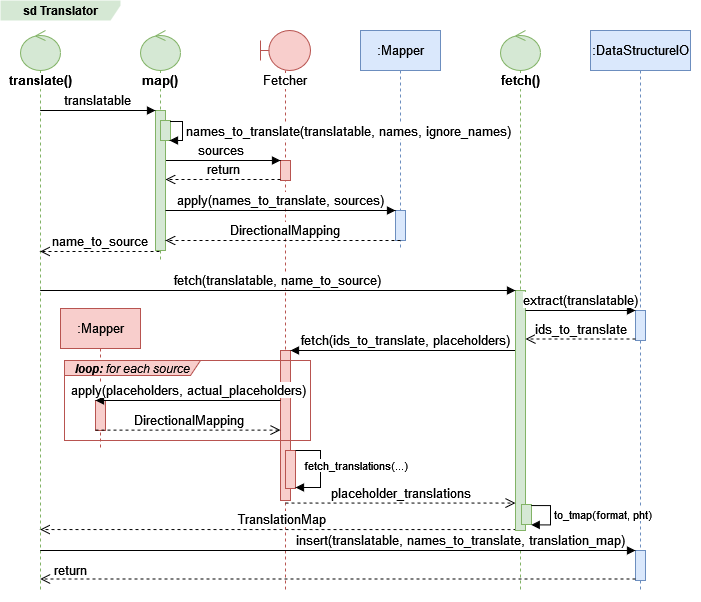
See the Translation primer for a high-level overview of the Translator plumbing.
Basic usage#
Using the Translator.translate() method.
tr = Translator(...)
df = pd.DataFrame([[1, 1904]], columns=["animals", "people"])
tr.translate(df, fmt="{id}:{name}[, nice={is_nice}]", copy=False)
The fmt argument is optional, but copy=False is not since the default is True. Let’s look at the result:
print(df)
               animals     people
0  1:Morris, nice=True  1904:Fred
This is a simplified version of an example from the Translator class
documentation. See the API reference for more.
Shortcuts#
Click an image below to get started, or use the top navigation bar.