
Mapping primer#
The main entry point for mapping tasks is the id_translation.mapping.Mapper class.
See also
If you haven’t already, consider checking out the Translation primer before continuing.
There are two principal steps involved in the mapping procedure: The Step 1/2: Scoring procedure (see
Mapper.compute_scores) and the subsequent Step 2/2: Matching procedure
(see Mapper.to_directional_mapping). The two are
automatically combined when using the Mapper.apply-function, though they
may be invoked separately by users.
Step 1/2: Scoring procedure#
The Mapper first applies Overrides and filtering, after which the actual Score computations are
performed.
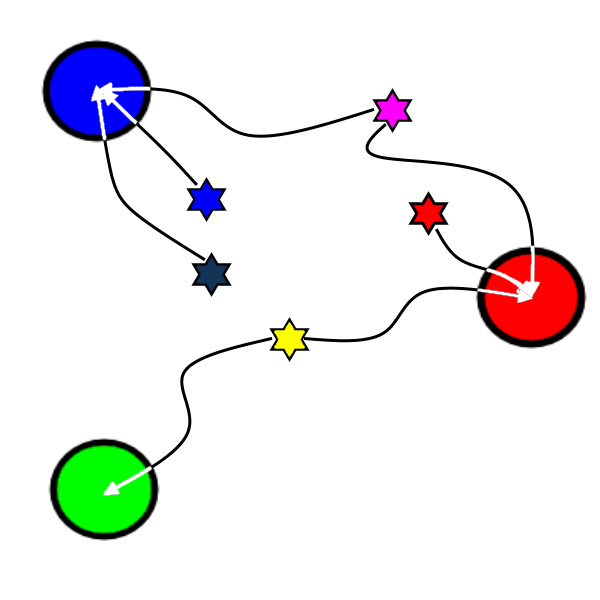
Colours mapped by
spectral distance (RGB).
Overrides and filtering#
Overrides and filtering adhere to a strict hierarchy (the one presented below). Overrides take precedence over filters, and runtime overrides takes precedence over static overrides.
Runtime overrides (type:
UserOverrideFunction); setscore=∞for the chosen candidate, andscore=-∞for others.Static overrides (type:
dictorInheritedKeysDict); setscore=∞for the chosen candidate, andscore=-∞for others.Filtering (type:
FilterFunction); setscore=-∞for undesirable matches only.
Hint
Score-based mapping trades precision for convenience. This may be undesirable, especially for fetching as this may incur additional costs. See the Override-only mapping section for details.
Score computations#
Compute value-candidate match scores (type:
ScoreFunction). Higher is better.If there are any Heuristics (type:
HeuristicScore), apply..Short-circuiting (type:
FilterFunction); reinterpret aFilterFunctionsuch that the returned candidates (if any) are treated as overrides.Aliasing (type:
AliasFunction); try to improveScoreFunctionaccuracy by applying heuristics to the(value, candidates)-argument pairs.Finally, select the best score at each stage (from no to all heuristics) for each pair.
The final output is a score matrix (type: pandas.DataFrame), where columns are candidates and values make up
the index.
store |
category |
customer |
staff |
film |
|
|---|---|---|---|---|---|
film_id |
0.100 |
0.040 |
0.040 |
0.100 |
1.000 ★ |
category_id |
0.125 |
1.000 ★ |
0.222 |
0.042 |
0.040 |
store_id |
1.000 ★ |
0.125 |
0.042 |
0.500 |
0.100 |
rental_date |
-∞ |
-∞ |
-∞ |
-∞ |
-∞ |
The 'rental_date'-value can be seen having only negative-infinity matching scores due to filtering.
Hint
The Translator.map_scores-method returns Name-to-source mapping scores.
Step 2/2: Matching procedure#
Given precomputed match scores (see the section above), make as many matches as possible given a Cardinality
restriction. These may be summarized as:
OneToOne= ‘1:1’: Each value and candidate may be used at most once.OneToMany= ‘1:N’: Values have exclusive ownership of matched candidate(s).ManyToOne= ‘N:1’: Ensure that as many values as possible are unambiguously mapped (i.e. to a single candidate). This is the default option for newMapperinstances.ManyToMany= ‘M:N’: All matches above the score limit are kept.
In theory, OneToMany and ManyToOne are equally restrictive. During mapping however, the goal is usually to
find matches for values, not candidates. With that in mind, the ordering above may be considered strictly decreasing
in preciseness.
Conflict resolution#
When a single match out of multiple viable options must be chosen due to cardinality restrictions, priority is determined by the iteration order of values and candidates. The first value will prefer the first candidate, and so on. This logic does not consider future matches.
>>> mapper = Mapper(cardinality='1:1', score_function=lambda value, *_: [1, 0] if value == 'v1' else [1, 1])
>>> mapper.compute_scores(['v0', 'v1'], ['c0', 'c1'])
candidates   c0   c1
values
v0          1.0  1.0
v1          0.0  1.0
>>> mapper.apply(['v0', 'v1'], ['c0', 'c1']).flatten()
{'val0': 'cand0'}
Notice that val1 was left without a match, even though it could’ve been assigned to cand0 if the equally viable matching val0 → cand1 had been chosen first.
Note
A score matrix like this will raise AmbiguousScoreError for any cardinality that requires a single
candidate (including 1:1).
Troubleshooting#
Unmapped values are allowed by default. If mapping failure is not an acceptable outcome for your application, initialize
the Mapper with on_unmapped='raise' to ensure that an error is raised for unmapped values, along with
more detailed log messages which are emitted on the error level.
Mapper verbose-messages#
The id_translation.mapping.*.verbose loggers emit per-combination mapping scores when matches are made or when
values are left without a match. Records from these loggers are always emitted on the DEBUG-level.
Note
All verbose messages are suppressed unless Mapper.verbose_logging is True.
The messages below are from a test case in a strange world where only one kind of animal is allowed to have a specific number of legs.
id_translation.mapping.Mapper.verbose: Accepted: 'dog' -> '4'; score=inf (short-circuit or override).
id_translation.mapping.Mapper.verbose: This match supersedes 7 other matches:
    'cat' -> '4'; score=1.000 (superseded on candidate=4).
    'three-legged cat' -> '4'; score=0.000 < 0.9 (below threshold).
    'human' -> '4'; score=0.000 < 0.9 (below threshold).
The severity of unmapped values depends on the application. As such, the level for these kinds of messages is determined
by the Mapper.on_unmapped-attribute.
 id_translation.mapping.Mapper.verbose: Could not map value='cat':
     'cat' -> '4'; score=1.000 (superseded on candidate=4: 'dog' -> '4'; score=inf).
     'cat' -> '0'; score=0.000 < 0.9 (below threshold).
Even if on_unmapped='ignore', records are still emitted on the DEBUG-level under the verbose
logger namespace.
Managing verbosity#
Verbose messages may be permanently enabled by initializing with verbose_logging=True. To enable temporarily, use
the enable_verbose_debug_messages() context.
from id_translation.mapping import Mapper, support
with support.enable_verbose_debug_messages():
    Mapper().apply(<values>, <candidates>)
The Mapper uses this same function internally when the verbose flag is set.
id_translation.mapping.verbose.filter_functions.require_regex_match: Refuse matching for name='a': Matches pattern=re.compile('.*a.*', re.IGNORECASE).
id_translation.mapping.verbose.HeuristicScore: Heuristics scores for value='staff_id': ['store': 0.00 -> 0.50 (+0.50), 'payment': 0.07 -> 0.07 (+0.00), 'inventory': 0.00 -> 0.07 (+0.07), 'language': 0.00 -> 0.08 (+0.08), 'category': 0.00 -> 0.04 (+0.04), 'film': 0.05 -> 0.10 (+0.05), 'address': 0.00 -> 0.08 (+0.08), 'rental': 0.00 -> 0.08 (+0.08), 'customer_list': 0.00 -> 0.02 (+0.02), 'staff': 0.00 -> 1.00 (+1.00), 'staff_list': 0.00 -> 0.03 (+0.03), 'city': 0.00 -> 0.10 (+0.10), 'country': 0.00 -> 0.06 (+0.06), 'customer': 0.00 -> 0.04 (+0.04), 'actor': 0.00 -> 0.17 (+0.17)]
id_translation.mapping.verbose.filter_functions.require_regex_match: Refuse matching for name='return_date': Does not match pattern=re.compile('.*_id$', re.IGNORECASE).
The mapping procedure may emit a large amount of records in verbose mode.
Override-only mapping#
Score-based mapping is a convenient solution, especially for name-to-source mapping since the names (e.g.
pandas.DataFrame.columns) that should be translated have a tendency to change.
Note
Identity mappings always kept (no need for id = "id" overrides). To block these matches, you may create a dummy
override such as id = "_" for affected sources.
Names in sources (e.g. SQL table column names), on the other hand, tend to change a lot less. Scoring may then add an
unnecessary element of uncertainty. To ensure that mapping is done “manually”, you may use the included
score_functions.disabled()-function to disable the scoring logic.
SqlFetcher.# 1[fetching.SqlFetcher]
2connection_string = "postgresql+pg8000://postgres:Sofia123!@localhost:5002/sakila"
3allow_fetch_all = false
4whitelist_tables = ["customer", "category", "country"]
5
6[fetching.mapping.score_function.disabled]
7strict = true # raise instead of silently ignoring
8
9[fetching.mapping.overrides.customer]
10id = "customer_id"
11name = "first_name"
12[fetching.mapping.overrides.category]
13id = "category_id"
14[fetching.mapping.overrides.country]
15id = "country_id"
16name = "country"
In strict mode (the default), a ScoringDisabledError is raised if there are
any names left to map once all Overrides and filtering and short-circuiting logic
has been applied.
See also
The
short_circuit()andsmurf_columns()short-circuiting functions.The
filter_functionsmodule.
In non-strict mode (strict=False), any name left to map once the scoring phase begins will be
silently discarded by returning \(-\infty\) for all value/candidate-pairs.