
Translation primer#
This document will be dedicated to a toy example – translating a “Bite report” from a misfortunate petting zoo – in order to demonstrate some key concepts. Each new component will be presented in the order in which they are used during normal operation.
To keep things simple, we will keep everything in a single folder – the current working directory – for this example. The file structure is as follows:
. # current working directory
├── translation-primer.py
├── biting-victims-2019-05-11.csv
├── biting-victims-2019-05-11-translated.csv
└── sources
    ├── animals.csv
    └── humans.csv
This example uses the API to construct the Translator instance, but the recommended way of creating instances are
Configuration. Condensed versions for creating an equivalent Translator using the either the API or TOML
configuration is available in the Notebooks section.
Call diagram#
The Translator either performs or coordinates most task. A
notable exception the placeholder mapping subprocess, which is
handled internally by AbstractFetcher.map_placeholders.
Green indicates a
Translatormember function.Red denotes
fetcherownership.Blue indicates a task that is delegated to an object owned by the
Translator.
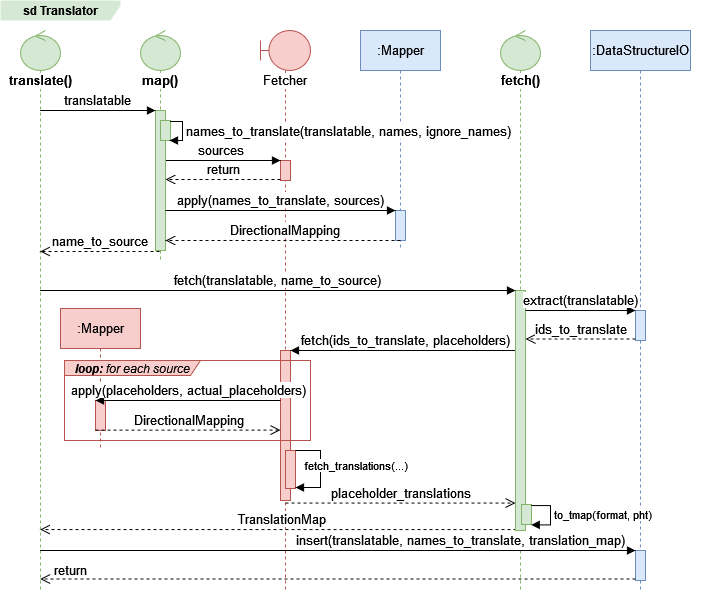
Simplified call diagram for a translation task. Optional paths and error handling are omitted, as well as most details that are internal to the mapping and fetching processes.#
A fetching.PandasFetcher is used in the example below, meaning that
sources are resolved by searching for files in a given directory, and
actually fetching translations means reading files
in this directory.
Real applications typically use something like a SQL database instead. Underlying
concepts remain the same, no matter how translation data is retrieved.
Translatable data#
The “Bite report” to translate is shown below.
human_id |
bitten_by |
|---|---|
1904 |
1 |
1991 |
0 |
1991 |
2 |
1999 |
0 |
The first columns indicates who was bitten (a human), the second who bit them (an animal). Since bites are a frequent
occurrence, the zoo uses integers IDs instead of plaintext for their bite reports to save space. The Translator
doesn’t work on files, so we’ll translate a pandas.DataFrame instead.
from pandas import DataFrame, read_csv
bite_report: DataFrame = read_csv("biting-victims-2019-05-11.csv")
The Translator knows what a DataFrame is, and will assume that the columns are names to translate.
Note
In the language of the Translator, the bite report is a Translatable. The columns
'human_id' and 'bitten_by' are the names that must be
translated.
Translation sources#
The zoo provides reference tables which allows us to make sense of the data. These tables are stored as regular CSV files and contain some basic information about the humans and animals that are referenced in the (for now) unintelligible bite report.
|
|
To access these tables, the Translator needs a Fetcher that can read and
interpret CSV files. The PandasFetcher is built to perform such tasks.
from fetching import PandasFetcher
fetcher = PandasFetcher(
    read_function=read_csv,
    # Look for .csv-files in the 'sources' sub folder of the current working directory
    read_path_format='./sources/{}.csv'
)
This fetcher will look for CSV files in the sources sub folder of the current working directory, using
pandas.read_csv() to deserialize them. Source names will be filenames without the .csv-suffix.
Note
In the language of the Translator, the CSV files 'animals.csv' and 'humans.csv' are translation
sources. All fetching is done through the
Fetcher interface.
Name-to-source mapping#
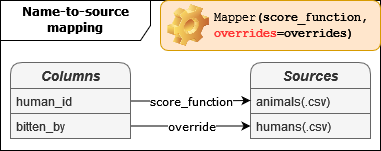
The mapping namespace modules are used to perform name-to-source mapping. By default, names and
sources must match exactly which is rarely the case in practice. In our case, there are two names that should be matched
to one source each.
Mapping human_id → humans. Mappings like these are common and may be solved using the built-in
like_database_table()heuristic.from mapping import HeuristicScore score_function = HeuristicScore("equality", heuristics=["like_database_table"])
Mapping bitten_by → animals. This is an impossible mapping without high-level understanding of the context. Using and override is the best solution in this case.
overrides = {"bitten_by": "animals"}
We’re now ready to create the Mapper instance.
from mapping import Mapper
mapper = Mapper(score_function, overrides=overrides)
Note
In the language of the Mapper, names become values and the
sources are referred to as the candidates. See the
Mapping primer page for more information.
Translation format#
We must now decide what we want our report to look like once it’s translated. First, we note that the first two columns,
'id' and 'name', are the same for humans and animals. The 'humans' source also has a unique 'title'
column (or placeholder). The 'animals' source has a unique 'species' placeholder.
We would like the translations to include as much information as possible, and as such we will use a flexible
Format that includes two
optional placeholders.
translation_format = "[{title}. ]{name} (id={id})[ the {species}]"
The use of optional blocks (placeholders and string literals surrounded by angle brackets [..]) allows us to use the
same translation format for humans and animals.
Note
The translation Format specifies how translated IDs should be represented. The
elements 'title', 'name', 'id', and 'species' are called placeholders.
The 'name' and 'id' placeholders are required_placeholders;
translation will fail if they cannot be retrieved. The others – 'title' and 'species' – are
optional_placeholders.
Placeholder mapping#
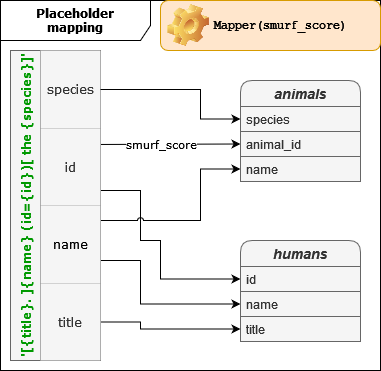
Analogous to name-to-source mapping, placeholder mapping binds the wanted placeholders
of the translation Format to the actual placeholders
found in the source.
Note
In the language of the Mapper, wanted placeholders become values
and the actual placeholders are referred to as the candidates.
The source or file which we are performing mapping for is referred to as the
context.
All placeholder names also match exactly, except for the 'animal_id' placeholder in the 'animals' source. The
easiest solution is to use an override. However, as this kind of naming is common, a more generic solution makes sense.
AliasFunction heuristic to turn 'animal_id' into just 'id'.#def smurf_column_heuristic(value, candidates, context):
"""Heuristic for matching columns that use the "smurf" convention."""
return (
# Handles plural form that ends with or without an s.
f"{context[:-1]}_{value}" if context[-1] == "s" else f"{context}_{value}",
candidates, # unchanged
)
smurf_score = HeuristicScore('equality', heuristics=[smurf_column_heuristic])
Placeholder mapping is the responsibility of the Fetcher. The reason for this is that the required mappings are
often specific to a single source collection (such as a database). Having separate
mappers makes fetching configuration easier to maintain for
applications that use multiple fetchers.
# Amend the fetcher we created earlier.
fetcher = PandasFetcher(
   read_function=read_csv,
   read_path_format=".source/{}.csv",
   mapper=Mapper(smurf_score),  # Add the mapper.
)
With placeholder mapping in place, all the remains is to create the Translator.
Putting it all together#
from id_translation import Translator
translator = Translator(fetcher, fmt=translation_format, mapper=mapper)
translated_bite_report = translator.translate(bite_report)
Unless copy=False is passed, translate() always returns a copy.
Translated data#
human_id |
bitten_by |
|---|---|
Mr. Fred (id=1904) |
Morris (id=1) the dog |
Mr. Richard (id=1991) |
Tarzan (id=0) the cat |
Mr. Richard (id=1991) |
Simba (id=2) the lion |
Dr. Sofia (id=1999) |
Tarzan (id=0) the cat |
Staying true to his reputation, Tarzan the cat has claimed the most victims.
Notebooks#
Implementations may be found in the following notebooks: